Stay alert with my.plan
With bespoke usage notifications and spend controls
Running or supporting a business can be stressful enough without also having to worry about controlling monthly bills and keeping everyone connected. That’s where my.plan notifications come in!
Set up bespoke email and SMS notifications to stay alert to people approaching usage allowances or Spend Control limits.

What are alerts and how do they work?
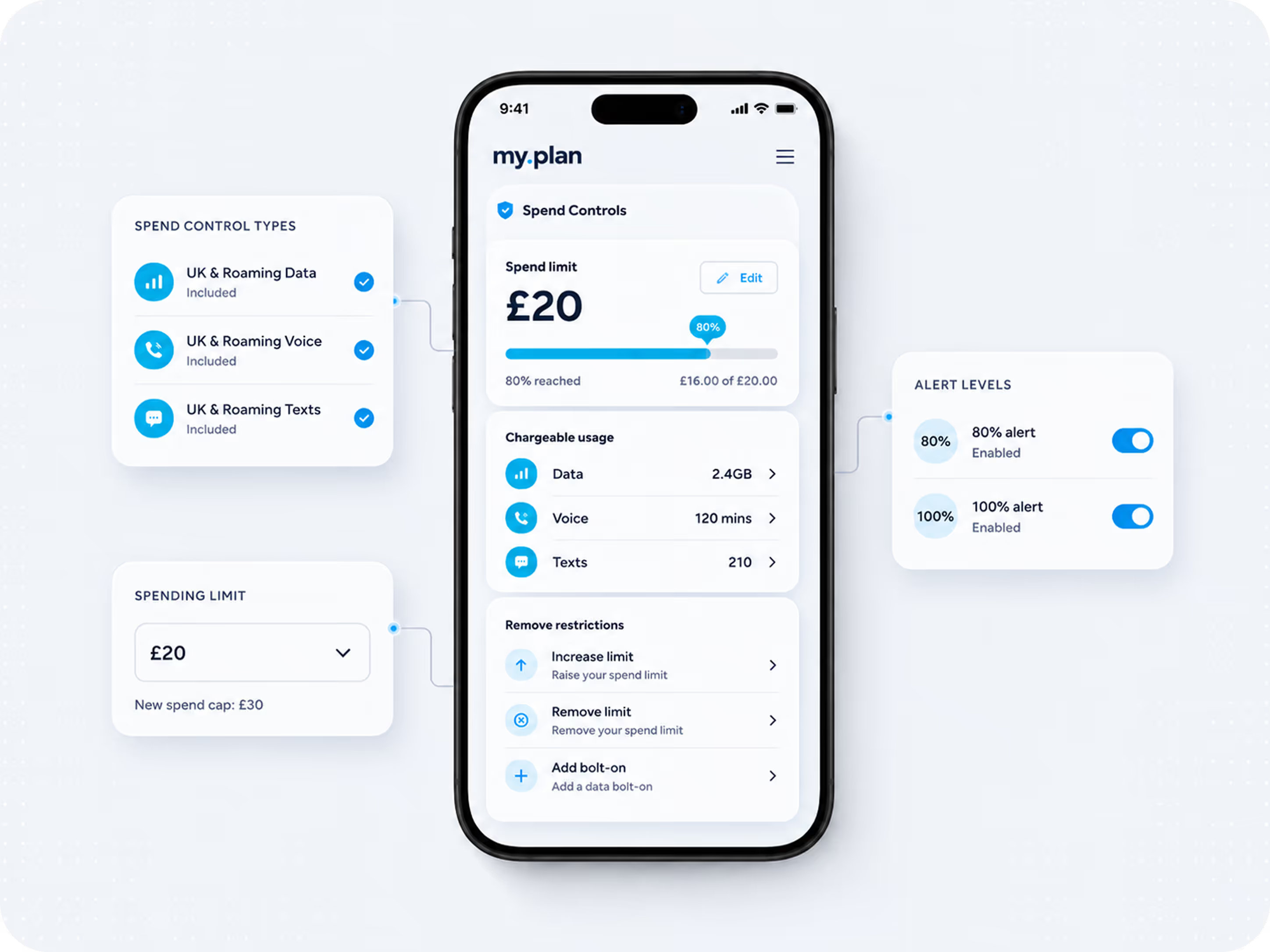
Notifications are emails and/or SMS that are sent when 50%, 80% and/or 100% of your data, voice or text allowance is used. They are also sent when 80% and 100% or your Spend Controls are reached.
You set the levels at which you are notified, who is informed and how.
Managing alerts in my.plan
Gold and Platinum services benefit from the full range of bespoke and tailored alerts. You can manage usage notifications and Spend Controls and their notifications through the CONTROLS option in my.plan.
Spend Controls
Spend Controls restrict a service’s ability to use data, make chargeable calls or send chargeable texts to prevent additional charges above a limit that you set. They do this by disabling chargeable usage such as those made to International, Premium and Non-geographic numbers, or using data outside of your allowance.Usage restrictions can be removed by increasing or removing the Spending Limit, or adding a relevant bolt-on. Usage restrictions put in place by Spend Controls are automatically removed at the start of the next month when allowances are reset.Types of Spend Control 80% and 100% notifications are linked with the following types of Spend Control, which you manage via my.plan:
- UK & Roaming Data
- UK & Roaming Voice
- UK & Roaming Texts
Captive pages
An Incredible way to keep you connected & in control of your cost.
plan.com services with Spend Controls benefit from Captive Pages.
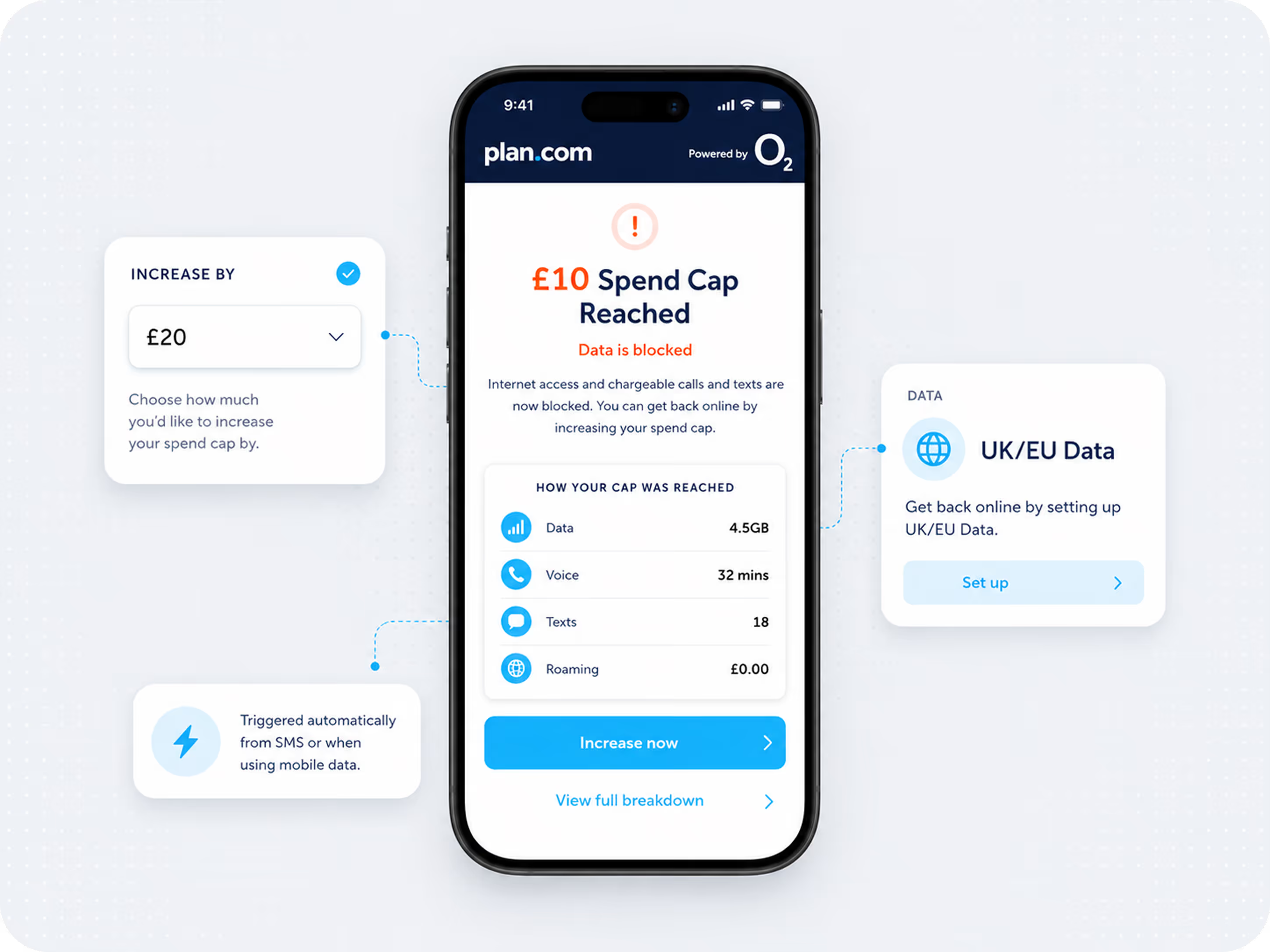
Captive Pages are webpages that are triggered automatically, or via a link in an SMS or email when a Spend Control is activated, and a service is restricted. Our range of Spend Controls can be accessed via my.plan, and help you to stay in control of your costs, while keeping your business connected.
Captive Pages give you the opportunity to increase their Spend Limit, or purchase bolt-ons directly from their phone in order to stay connected.
No need to download an app. No need to play with settings. Captive Pages are available to all plan.com services.
Frequently Asked Questions
Support made simple – dive into our help articles and guides.
How do I access captive pages
Via SMS or email
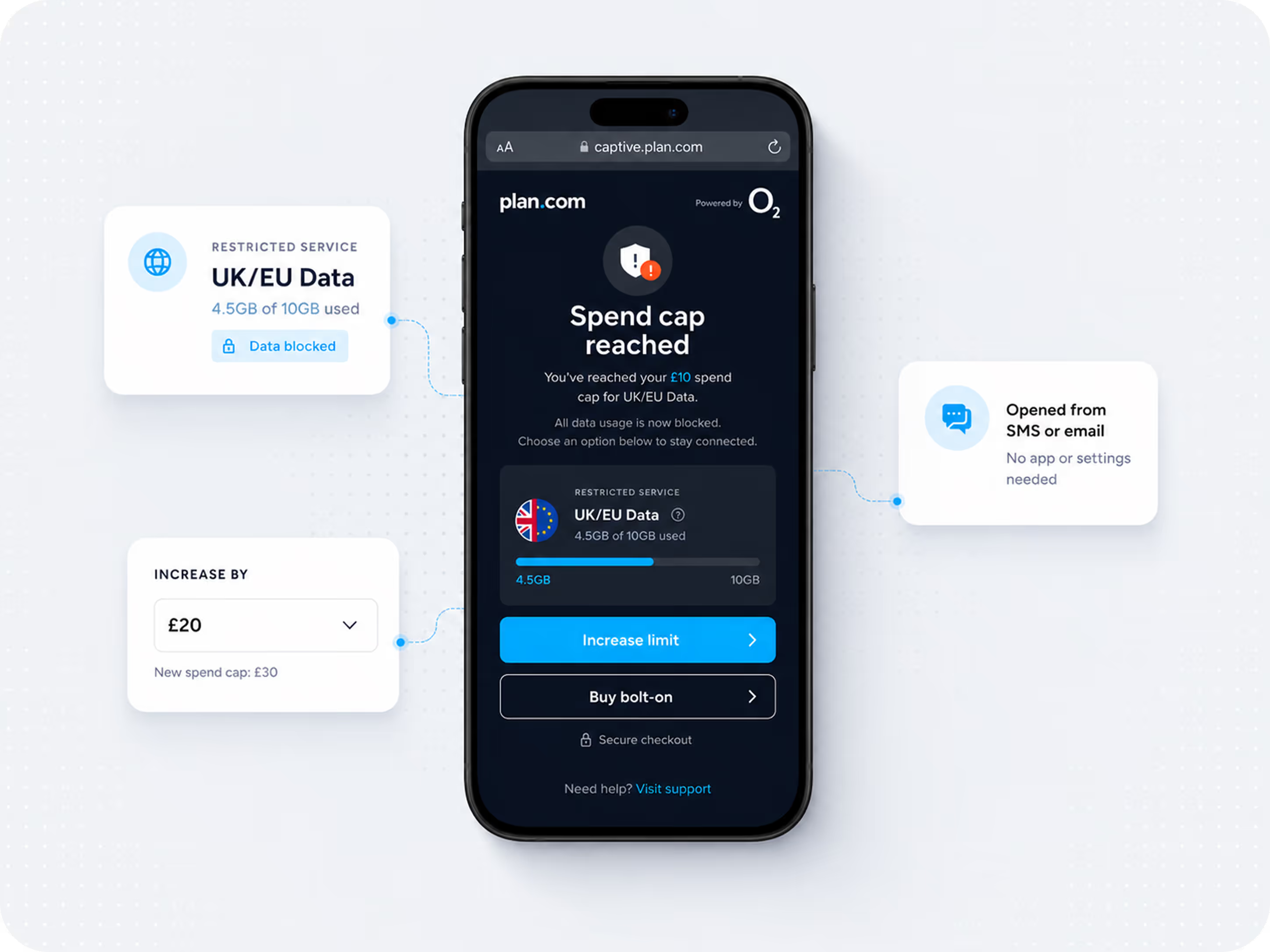
Captive Pages are available through an SMS or email link whenever a Spend Control is activated.
Automatically
They also appear automatically when a UK mobile data Spend Control is activated, and data is restricted. In these circumstances, Captive Pages will launch when an internet browser or app that uses data is accessed.
However, they will not show if the service is connected to Wifi.
All the insights at your fingertips
If you have a Spend Control in place, Captive Pages show you exactly how much data, call, text, or roaming additional charges have contributed to reaching your Spend Limit.
The tools you need to stay connected
The tools you need to stay connected with If your service has been restricted due to a Spend Control, you can restore connectivity in my.plan.com by increasing your Spend Limit or purchasing a bolt-on to add extra allowance to your service.
When do you see captive pages?
Whenever a service reaches a Spend Limit and your service is restricted.
Who is notified
You can choose who is notified and how (by SMS or email) on the same page that you set up Spend Controls on my.plan. Go to my.plan > Controls > Spend Controls and choose from our range of Controls.
Types of Captive Page
There are two types of Captive Page:
OFCOM total spend cap
If you joined or have renewed with plan.com since 1 October 2018 and have an Ofcom Total Spend Cap on your account, you will be sent an SMS at 100% of your Cap’s limit that contains a link to a Captive Page. If you have run out of mobile data and are not connected to a Wifi network, a Captive Page will trigger automatically if you try to access mobile data via a web browser or mobile app that uses data.
Ofcom Total Spend Cap Captive Pages provide you with a full breakdown of how your Cap was reached. This could include Data, Voice, Text, and any roaming usage (except calls and texts to non-geographical or premium-rate numbers).
Usage spend controls
If you have usage Spend Controls (such as a UK data or roaming voice) set up on your service, you will be sent an SMS or email at 100% of your Spend Limit with a link to a Captive Page. Please note: these notifications are set up in-line with the Spend Control via my.plan – you can choose who is notified and how (by SMS and email).
If you have run out of UK mobile data and are not connected to a Wifi network, a Captive Page will trigger automatically whenever you try to access mobile data via a web browser or mobile app that uses data.
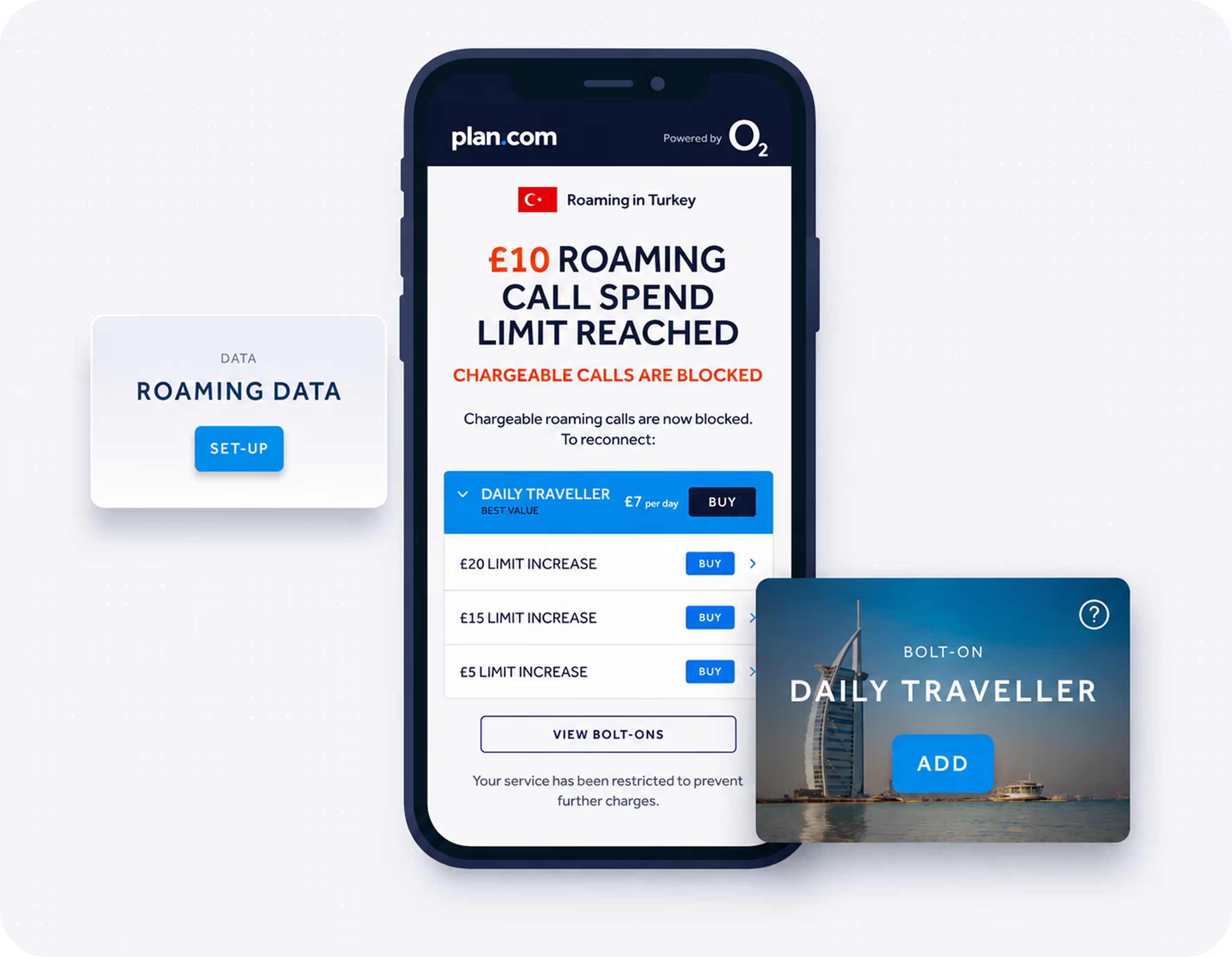
Usage Captive Pages are specific to the type of restriction that’s in place. For example, if a UK data restriction has been triggered, the Captive Page will be specific to your UK data usage. If it’s a roaming voice restriction – likewise.
Usage-based Captive Pages provide an additional layer of information when you’re roaming. They show you where you are, provide insight on any roaming bolt-ons you have in place, as well as information on any domestic usage that contributed to reaching the Spend Limit.
Adding bolt-ons
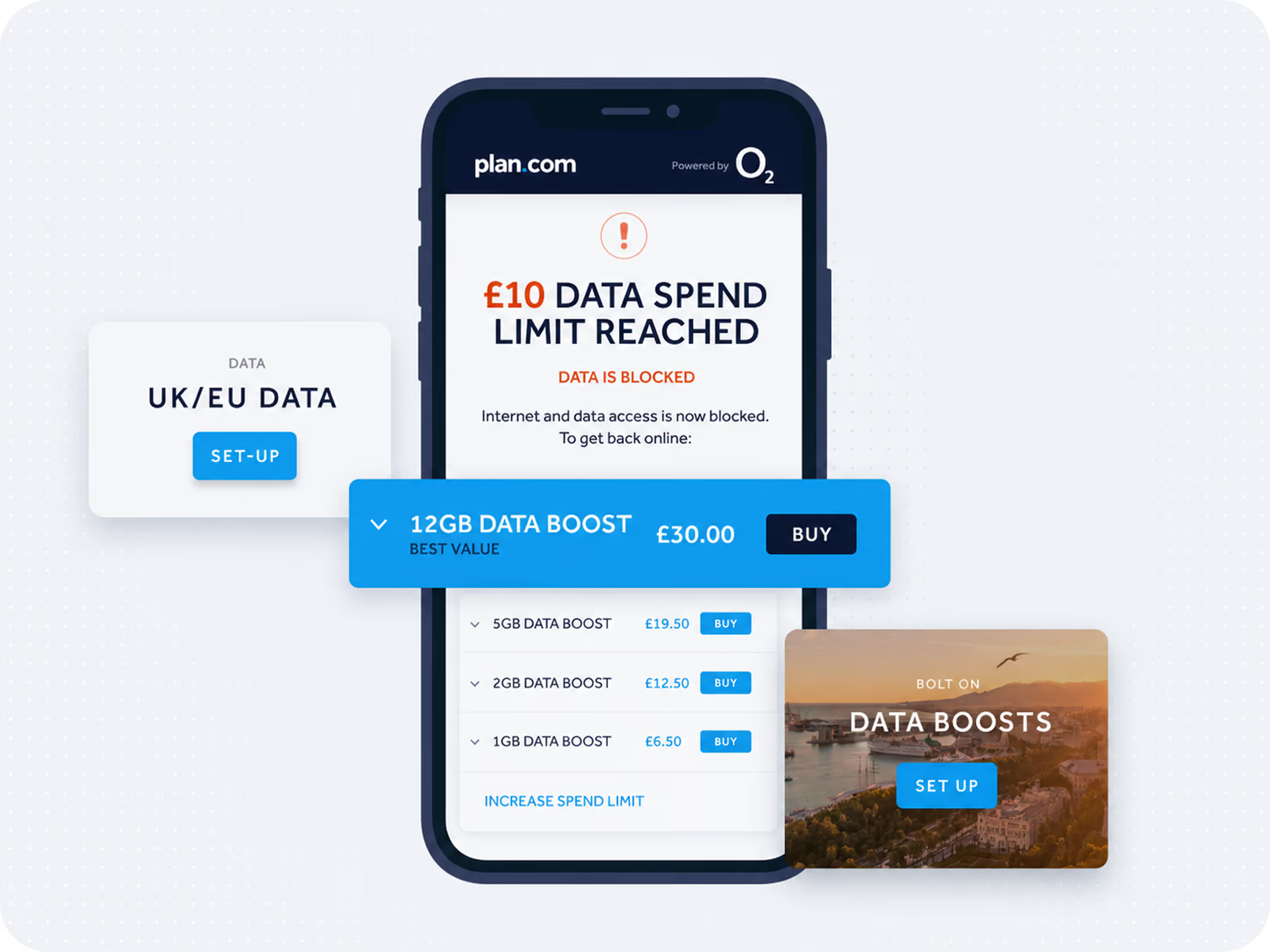
We have a series of great-value bolt-ons available to all plan.com customers, which can now be added via Captive Pages.
These include 1GB, 2GB, 5GB, 8GB & 12GB Data Boosts (handy if you’re running low or run out of UK/EU mobile data), international call and text options, and a series of roaming bolt-ons that help to keep you connected while travelling outside the plan.com Europe Zone.
Increasing spending limits
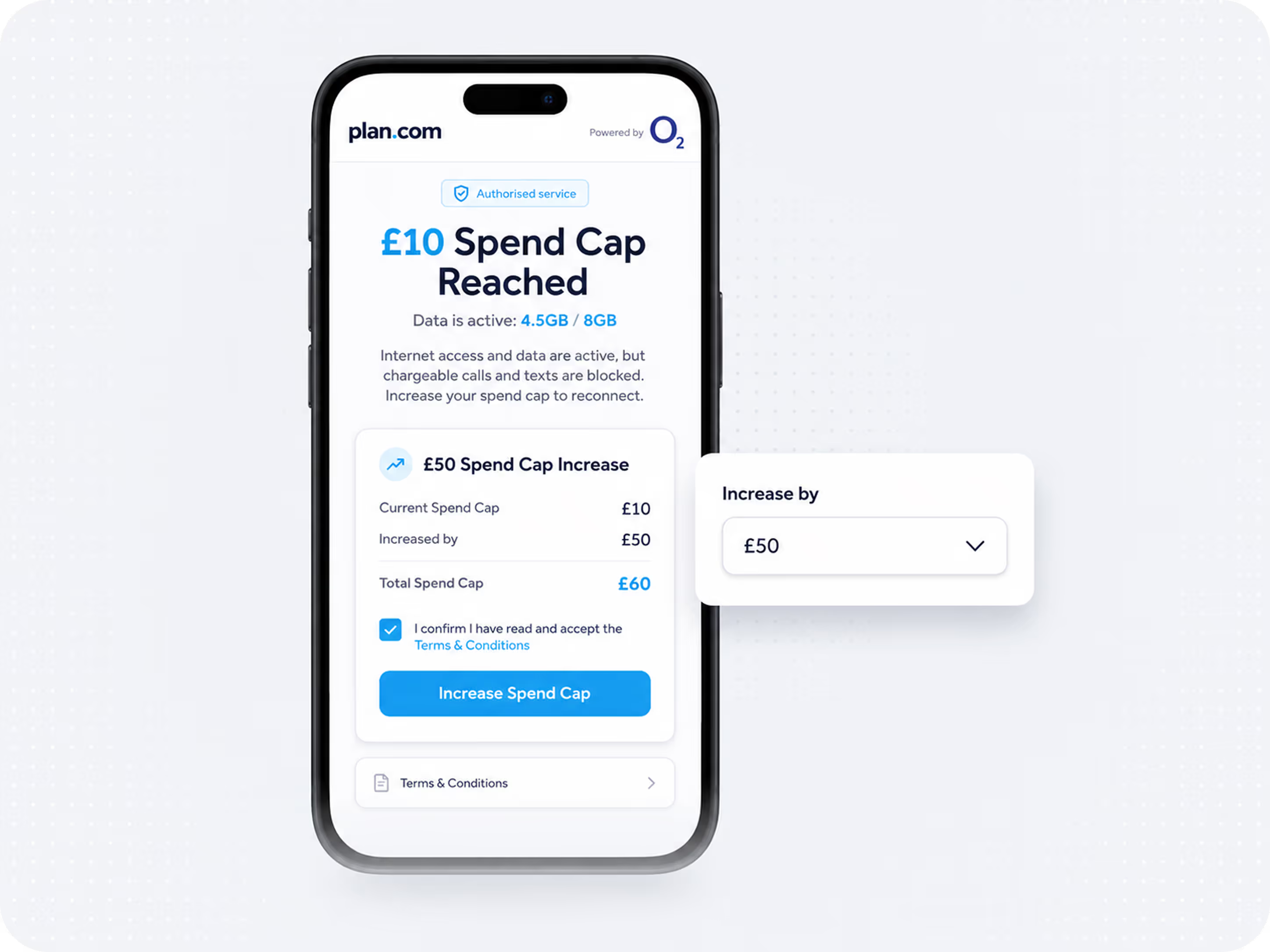
One of the easiest ways to remove the restrictions on a service put in place by a Spend Control is to increase the Spend Limit. Captive Pages give you this ability – allowing you to increase the Spend Limit by a set amount.
Spend Controls can be set at £0, £10, £15, £20, £35, £50, £75, £100, £200, £300 and £500 for each service.
If the new Spend Limit is reached, the service will be notified and restricted in the same way as with the original Spend Limit.
This is true for all subsequent increases of the Limit.
Authorised services
All services on your account will have the ability to increase their Spend Limit via Captive Pages unless the service is deauthorised from doing so.
To deauthorise a service and remove this ability to increase Spend Limits or purchase bolt-ons, simply call your plan.com partner or speak to plan.com Customer Services on +44(0)3300 88 18 18.
Deauthorised services will still receive Captive Pages, but for informational purposes only.
Financial information such as the Spend Limit amount and the amount of additional charges that were incurred to reach the Limit, is hidden.
How do spend controls work?
Spend Controls restrict the amount of additional charges that can be incurred by a service by notifying them when a Spend Limit is being approached and reached, and restricting the service when the Spend Limit is reached so it can no longer be used in a way that generates additional charges.
Spend Controls are removed at the start of every billing cycle. In the case of a service being restricted, these restrictions are also removed.
When restrictions are put in place, a service is still able to use any remaining inclusive allowances and free services.
plan.com is a business service provider, which means our Spend Controls work slightly differently to High Street providers because it is common that as a plan.com customer, you have more than one service with us. Therefore, our Spend Controls apply to each service (e.g. phone) on your account rather than to your entire account. This is so you can set up specific Spend Limits for every service that’s on your account.
Got more questions?
£0 Spend controls
Customers have the option to apply £0 Spend Controls to their services. In these cases, the service will be automatically restricted so that some types of usage (such as premium-rate and international calls, roaming etc.) are unavailable. You should only opt to select a £0 limit if you understand that certain kinds of usage will be unavailable to your service.
Settings the right limit
Spend Controls offer a broad safety net against bill shock and give you confidence that your monthly costs are under control. However, setting a Spend Control too low may lead to services being constantly restricted and prevent the person using the phone from being connected with the business and its customers.
Please remember when setting an appropriate Spend Control, a certain proportion of out of bundle spend is to be expected on any corporate account. For example, international calls, premium-rate calls or roaming usage may be an essential element of your business. Therefore, setting a Spend Limit too low may be an obstruction to the business.
What happens if a service reaches its spend limit?
Any further chargeable call, text or data usage will be restricted (depending on the Spend Control that you opt for). If you exhaust your monthly allowances and/or bolt-on allowances, additional calls, texts and data usage may be barred. A service will always be able to make calls to emergency services. Calls to plan.com Customer Services will also be available to most services.
Any usage that is still within the agreed allowances will not be restricted. For example, with our unlimited minutes and texts tariffs, you will still be able to call or text other plan.com and O2 mobiles, local geographic numbers etc. And if you are still within your data allowance (you may have reached your Spend Limit due to calls), you can access mobile data as normal until the allowance is exhausted.
Can a spend control be increased in order to remove restrictions?
Yes. If you have set them up the service will be sent an SMS or email at 100% of its Spend Limit, which notifies the person using the device of the usage restrictions in place. The Captive Page linked from the message also gives the service the opportunity to purchase a bolt-on (giving them extra allowances) or increase the Spend Limit.
All services on your account with a Spend Control that’s been activated can make these purchases or increase their Spend Limit via Captive Pages unless authority has been removed. To deauthorise a service and remove this ability to increase Spend Limits or purchase bolt-ons, log in to my.plan and access Controls > Visibility & Access > Self Management.
The power is in your hands.
The app that brings together everything you need to manage your business mobiles.